 GET STARTED
The app to generate workouts with AI in seconds — personalized by goal, level, and available equipment. Manage clients, get paid by card in your own currency, or train on your own with 1,500+ exercises and the specialist catalog. All in one app — iOS, Android, and Web.

Technology that powers your experience
Trainer Connect evolves every week based on what trainers ask for. Here are the highlights from the past month:
AI builds the meal plan using the TACO food database based on the student's assessment and training. The grams are calculated for you: calories and macros land within 5% of the target.
Learn more → NutritionThe student snaps a photo of their plate, and AI logs the food, grams, and macros in their diary. Each student gets 6 free photos a day.
Learn more →Ten post templates for feed and stories, in your brand color and with your name. Change the text, add a photo if you like, and share straight from the app.
Request a signature on a student's contract and they sign right in the app, with a drawn signature, a selfie, and their location.
On your own exercises, paste a YouTube, Vimeo, Instagram, TikTok, or Google Drive link. The video plays inside the student's app.
Your public page shows up to 6 student testimonials above your plans. You add each name and quote yourself.
Lab tests, body composition reports, medical notes, photos, or videos up to 50 MB stay on the student's profile.
Both techniques are now in the workout builder with how-to instructions, alongside drop sets, rest-pause, supersets, and more.
Set monthly goals for your students: reach a target load on an exercise, complete a number of workouts, or train X times a week. Progress updates on its own with each workout, and the streak shows consecutive weeks.
Subscriptions and credit top-ups paid in the web app come with a Brazilian service invoice (NFS-e) under your CPF or your studio's CNPJ.
Students, workout sheets, assessments, and meal plans from a screenshot, photo, or PDF from another app. AI reads it in, and you confirm before saving.
Trainer Connect is the personal trainer app with AI-powered body composition analysis from a photo. Take the assessment photos and AI estimates body fat percentage, somatotype, posture, and muscle asymmetries in seconds. No bioimpedance. No skinfold calipers. With the accuracy of the world's most advanced models.
Take photos of your client (front, back, side) during the fitness assessment and get a complete body composition analysis in seconds — right in the app.
The AI identifies imbalances between sides of the body, disproportions between muscle groups, and postural patterns worth attention — generating insights that guide workout prescription.
AI analysis only runs after explicit consent from the client, recorded in the app. Powered by Claude Sonnet from Anthropic, with a zero-retention policy — your photos never train models. Revocable at any time.
The values generated by AI are suggestions for personal trainers, who always reviews and adjusts before saving it to the student's assessment. The technology speeds things up — but the professional signs off on the report.
Every new assessment is saved to the history and can be compared side by side with previous ones. Photos, measurements, and AI estimates evolving over time — easy to show students and justify your work.
Export the full assessment — including the AI analysis reviewed by you — as a professional PDF ready to share with your client via WhatsApp, email, or print. Your brand, your name, your certification.
For personal trainers and independent students. From the first workout to getting paid, Trainer Connect handles everything so you can focus on what matters.
Generate personalized workouts in seconds based on goal, level, available equipment, and duration. Edit, save, and assign to clients in one tap.
Build complete workouts with exercises, sets, reps, and demo videos from a library of 1,500+ exercises.
Preview the entire workout before you start — exercises, sets, loads, and estimated time in an organized overview.
Drag and drop to reorder exercises in the workout. Build the perfect sequence with total freedom.
Swap exercises during your workout for alternatives from the same muscle group, without losing your pace.
Duplicate existing workouts as a draft to quickly adapt them for new students or training cycles.
Schedule when each training week goes live. Build 4, 8, or 12-week progressions that advance automatically right on time.
Automatic warm-up suggestions at the start and stretching at the end, based on the workout's muscle groups.
"Last time: 176 lbs × 10 reps" — the app shows the history so clients can progress with awareness on every set.
Find exercises by available equipment — dumbbells, barbell, cable, machine, or bodyweight.
Heart exercises for quick access. Your favorites always at the top of the list.
Heatmap calendar of every workout completed. Tap a day to see details — exercises, loads, and volume.
Get ready-made workouts built by certified professionals. Programs organized by goal, with featured popular and new sections.
Accidentally deleted a workout? Restore deleted workouts with a single tap and recover your full history.
Completed workouts are automatically logged to Apple Health and Google Health Connect with calories, duration, and activity type.
Once you confirm the set, the timer starts automatically with the duration set by your trainer. Notification, vibration, and sound when it hits zero — you can skip it anytime.
Earn experience points with every workout, level up, and keep your active-day streaks going. Constant motivation.
Unlock achievements for workouts completed, perfection, streaks, volume, and level — with bronze, silver, gold, and diamond tiers.
Automatic PR tracker — track your one-rep max records per exercise with complete history.
Top 5 students by XP with medals on the trainer dashboard. Encourage healthy competition among your students.
"Getting Started" — an interactive checklist for new clients to complete their profile, connect with their trainer, and start their first workout.
When you're done, rate your workout with stars and notes. Valuable feedback that helps your trainer fine-tune intensity.
Create custom competitions between your students. Set rules, a timeframe, and track the leaderboard in real time.
AI builds the plan proposal using the student's body assessment, intake form, and workout frequency. You review, tweak, and publish. Each plan uses 3 AI credits, and the Free plan includes 20 per month.
Meals, times, quantities, and substitutions with 600 foods from the TACO table and calculated macros. Calorie targets based on weight and goal, reusable templates, and PDF with your colors.
The client checks off each meal as it's completed and gets a reminder at the scheduled time for each one. You track weekly adherence, day by day, without ever having to ask.
Log 12 circumference measurements + weight with a visual guide showing where to measure each area. Auto-fills from the last assessment for consistent tracking.
Track your water intake with quick-add buttons (150/250/500ml), a customizable goal, and a daily progress bar.
Dosage, times, and days for each supplement, reminders with a "mark as taken" option, and daily adherence tracking for your clients.
Side-by-side comparison with front/back/side tabs, a date dropdown, and weight and body-fat % overlay.
Dashboard card for clients to log their current weight in one tap. History tracked automatically via assessments.
Calculate your one-rep max with 4 formulas (Epley, Brzycki, Lombardi, O'Conner) and a zone chart — strength, hypertrophy, and endurance.
Set numeric targets (goal weight, body fat %, measurements) and see dashed target lines right on your progress charts.
Automatically sync steps, calories, heart rate, and health data with the app.
Send a public link for your client to fill out the intake form before the consultation. Responses land ready in your dashboard with no prior sign-up.
Load and volume charts over time for each exercise. See progress clearly and objectively.
Horizontal bars showing each muscle group's weekly volume. Spot imbalances at a glance.
See the last 8 weeks of completed workouts in a trend chart. Stay consistent.
Heatmap calendar showing workout frequency — like GitHub contributions, but for exercise.
Weekly schedule heatmap highlighting the top 3 peak times. Perfect for trainers looking to optimize their schedule.
Breakdown of engaged, moderate, and inactive students with counts of missed sessions and cancellations.
Bar chart showing revenue from the last 6 months. Track your business's financial growth.
Communicate with each student individually. Send guidance, feedback, files, and motivation without leaving the app.
See when the other person is typing with an animated dots indicator — just like WhatsApp, but inside Trainer Connect.
Horizontal chips with ready-made phrases for trainers: "Nice work!", "Adjust the load", "Rest well". One tap to send.
When you finish your workout, share the full summary on social media or copy it to your clipboard.
Generate a ready-to-post caption for Instagram, Threads, or WhatsApp from a completed workout. Engaging copy in 1 tap, no more staring at a blank screen.
Toggle by notification type — chat, workout, payment, scheduling. The student controls what they receive.
Private trainer notes on each client — injuries, preferences, observations. Only the trainer can see them.
Switch between System, Light, and Dark. Perfect for late-night workouts without straining your eyes.
Invite students by email, track progress, body metrics, and each one's complete history.
Add team members with their own login and custom password. Each one accesses the system without sharing your account.
Set up automatic blocking for overdue students after X days. Instant reactivation as soon as payment is confirmed.
Offer monthly, quarterly, half-yearly, or annual subscriptions. Automatic recurring billing, on whatever cadence makes sense for the client.
Your students book sessions right from the app. Manage your schedule with holidays, reschedule requests, and automatic push notifications.
Connect your own payment account (Stripe outside Brazil; Asaas, Mercado Pago or PagBank in Brazil) and charge by card in your currency, or by Pix and boleto in Brazil. Recurring and one-time charges live in the same dashboard.
Delete your data anytime, in full compliance with LGPD. Your data, your control.
Customizable check-in templates for ongoing tracking. Questions about pain, sleep, and nutrition.
Visual profile-completion indicator. Know exactly what's missing for the full experience.
Sign in with one tap using your Google or Apple account. No password required — fast and secure.
Create custom contracts, send them for e-signature with geolocation, and track cancellations.
Clients save credit cards for recurring and one-time payments with a single tap — no re-entering details.
Built-in FAQ and direct support inside the app. Get answers about features without ever leaving.
You'll be up and running in minutes. No hassle, no red tape.
Sign up for free as a personal trainer and set up your professional profile.
Send invites by email. Your clients download the app and connect with you instantly.
Build workouts, schedule sessions, collect payments, and track each student's progress.
Gamification, integrated health data, and advanced analytics turn every workout into data, motivation, and real results.
Describe the goal, level, and equipment — the A.I. builds a structured workout in seconds, ready to edit, save, or assign to students.
Your clients earn XP, level up, unlock achievements, and compete for spots on the leaderboard.
Track every aspect of physical progress — measurements, hydration, photos, and wearable integration.
Real data dashboards that help trainers and students make evidence-based decisions.
Chat right inside the app — no mixing with personal WhatsApp. Quick replies with saved messages, attachments, and push notifications for both sides.
Connect your own payment account (Stripe outside Brazil; Asaas, Mercado Pago or PagBank in Brazil) and charge by card in your currency, or by Pix and boleto in Brazil. Confirmed payments show up right in your financial dashboard.
Stop wasting time on spreadsheets and WhatsApp. Get everything professionalized in an app that grows with you.
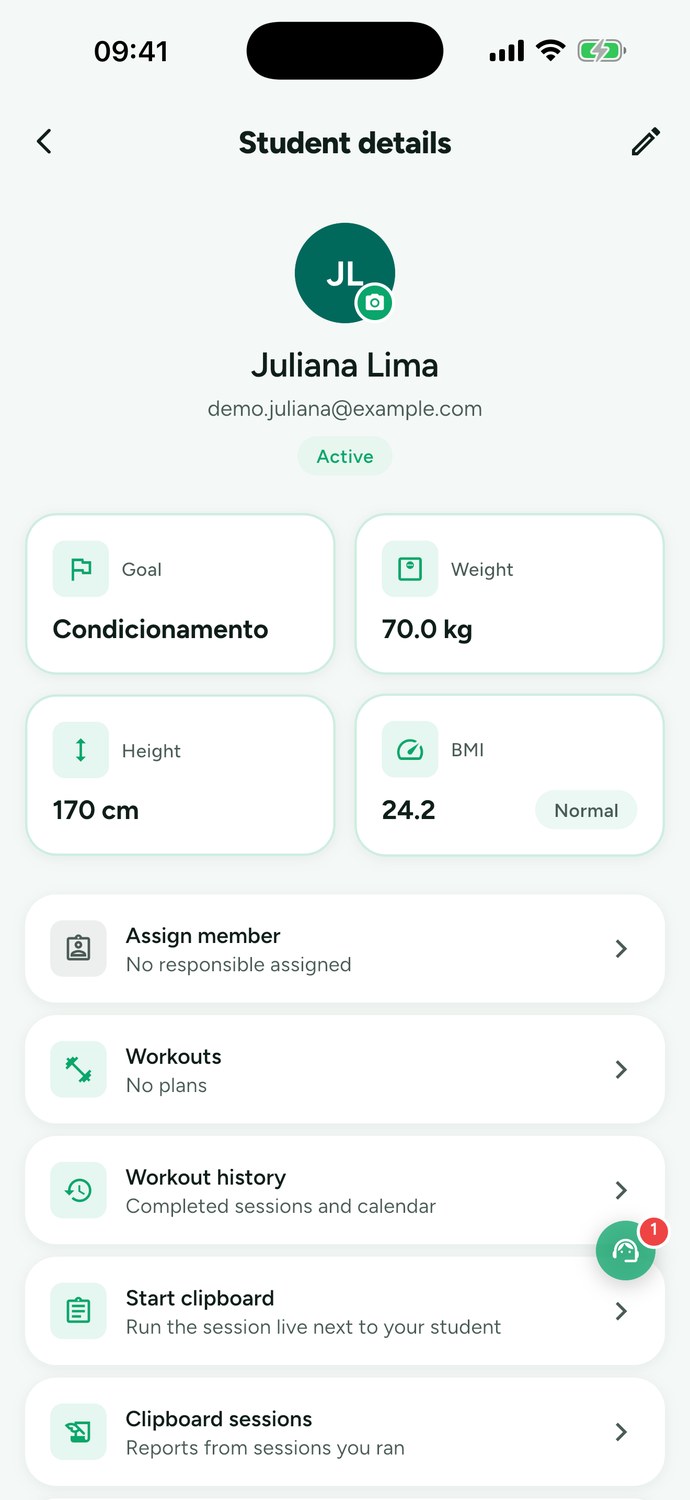
Train with your personal trainer or use the app on your own. A catalog of expert-designed workouts, gamification, and everything you need to progress.
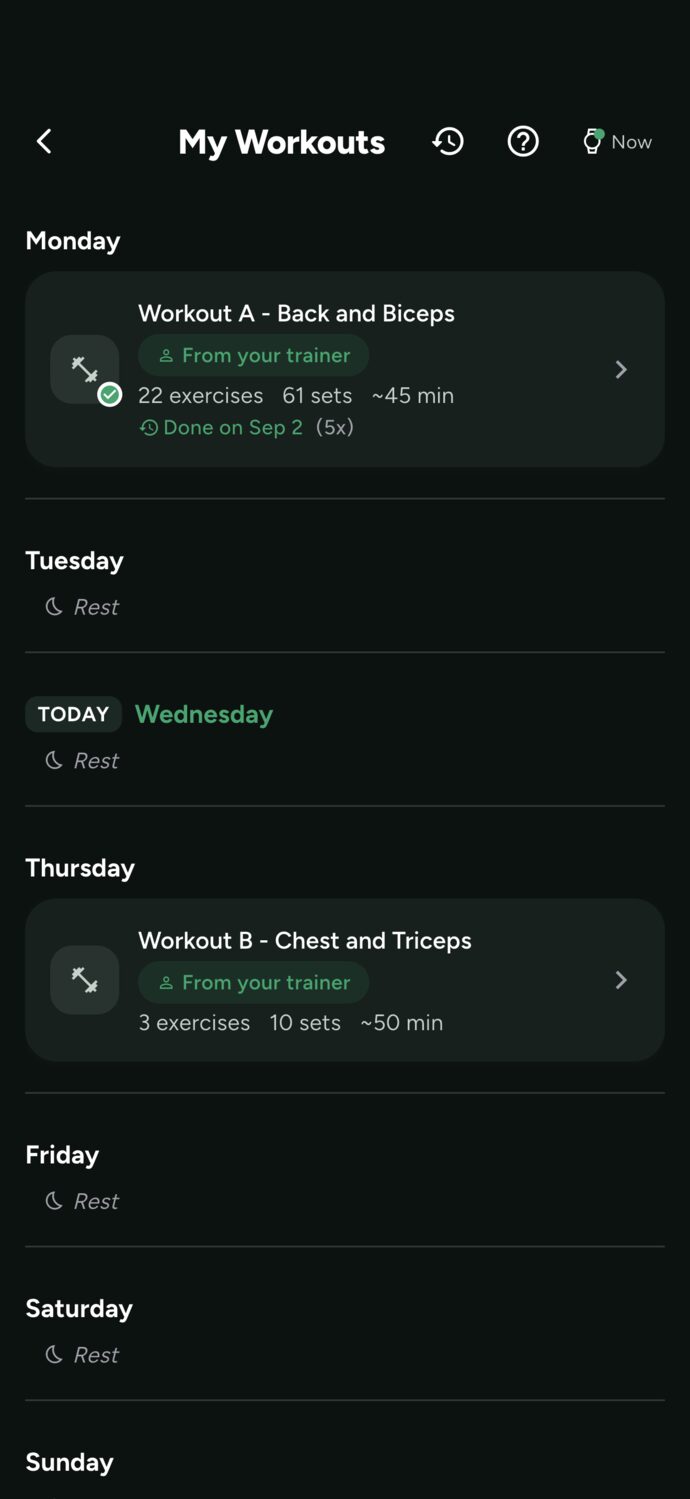
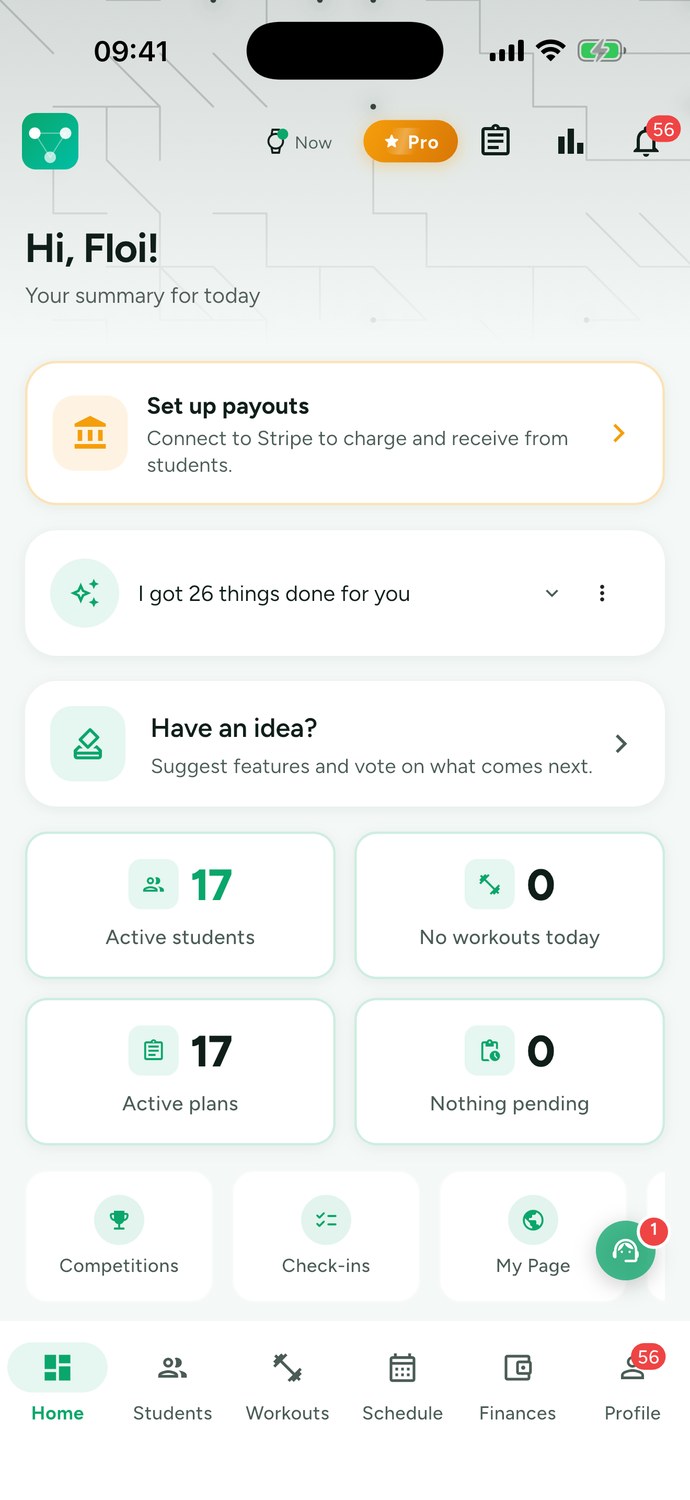
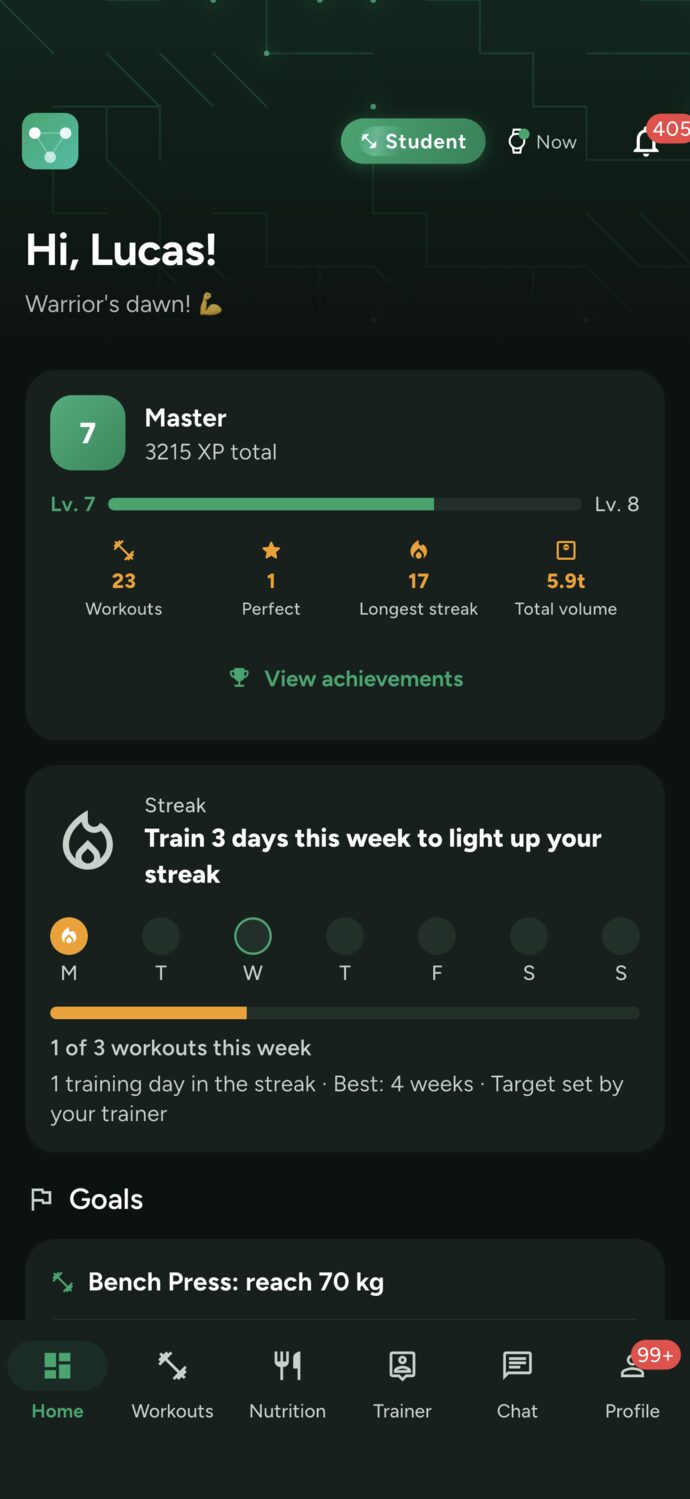
No mockups here: these are real screenshots of the app in action, on both the trainer side and the client side.
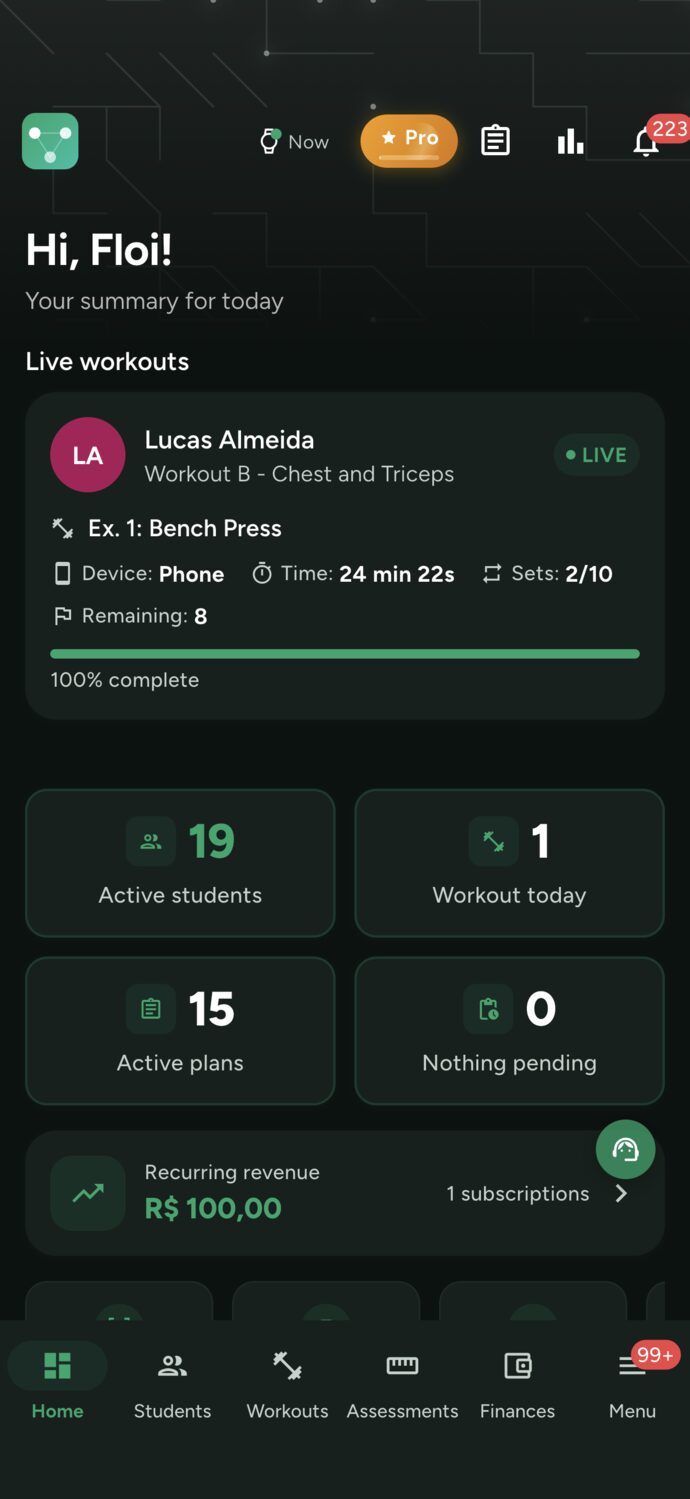
While your client trains, you see the current exercise, completed sets, and what's left — even remotely.
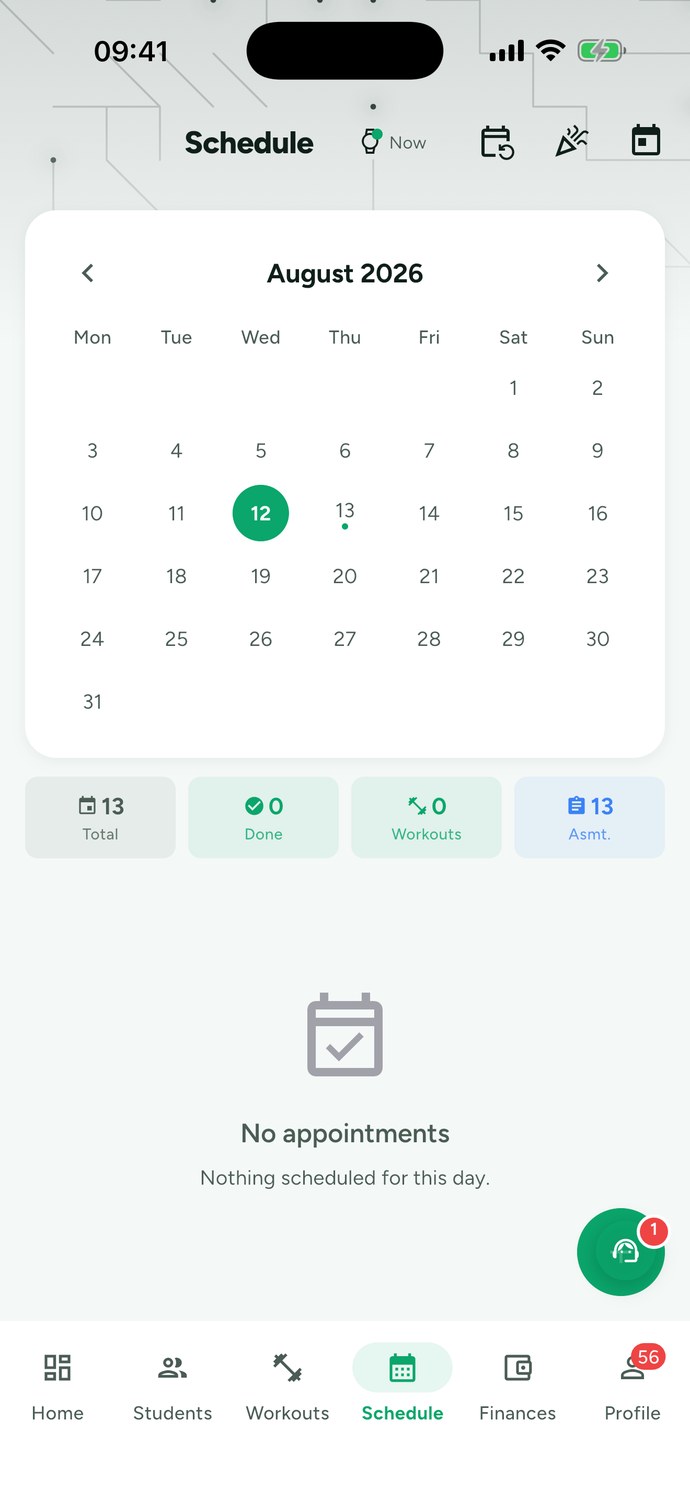
Confirmations, pending items, and session location all in one place. The client gets notified automatically.
Level, XP, day streak, and total volume. Those who see progress come back the following week.
Answer a few questions and the coach builds your program for the days you can train. It reminds you to work out, tracks every set, and adjusts your training with you, just like a personal trainer would. Programs are supervised by personal trainers.
Goal, level, days of the week, where you train, and any restrictions. In one minute, your program is ready, scheduled for your days, with video exercises.
At the time you choose, only on workout days. Missed a session? The next day it helps you get back on track, no guilt trips.
Questions about form, pain, exercise swaps, missing equipment: ask in the app's chat and it adjusts your workout right away.
Every week it reviews the loads and reps you logged and adjusts your program. Every 4 weeks, it builds the next phase.
Every program is reviewed by our team's personal trainers. And whenever you want in-person coaching, find a trainer through the app.
Unlimited coach: chat, weekly adjustments, and a new phase every 4 weeks
12 programs · 48 expert workouts
Go beyond the workout. Digital intake forms, full body assessments and live sessions make Trainer Connect the platform for those who take their profession seriously.
Create custom intake forms and send them to your students to fill out right in the app — no paper, no PDFs.
Log complete assessments — body composition, skinfolds, measurements — with progress comparisons between dates.
Track your student in real time during workout execution — perfect for high-performance online coaching.
Lead CRM, automatic recurring billing, and an Asaas payout account. Everything a trainer needs to run a real business — without becoming an accountant.
Every lead captured from your public page becomes a card in the app. Chat, qualify, and convert without missing an opportunity.
Automatically bill monthly fees every month. No invoices to send, no transfers to check, no chasing late payments over text.
Connect your own payment account (Stripe outside Brazil; Asaas, Mercado Pago or PagBank in Brazil) and charge by card in your currency, or by Pix and boleto in Brazil. Everything stays managed right in the app.
Coach clients anywhere — workouts, chat, billing, and progress tracking all in one app, in person and online.
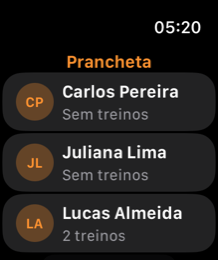
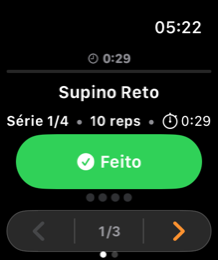
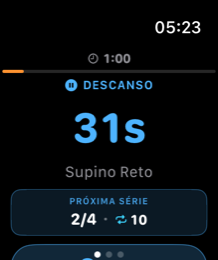
View online coaching →Your clients follow the workouts you built right on their watch — no need to bring a phone to the gym. Real-time progression, tactile feedback, and automatic sync once they're back in range of the phone.
watchOS · native SwiftUI · WatchConnectivity
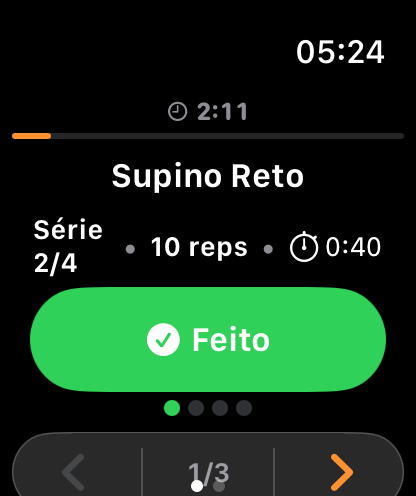
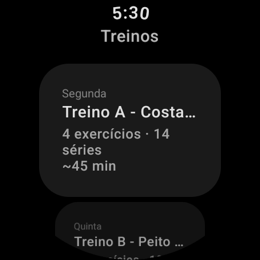
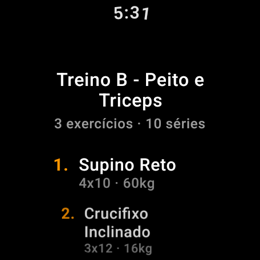
Synced workout list — every workout assigned by the trainer automatically shows up on the watch as soon as the iPhone app syncs.
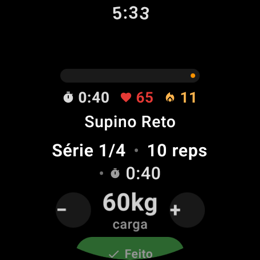
Guided set-by-set execution — exercise name, equipment, planned sets, load, and reps. One tap confirms each set.
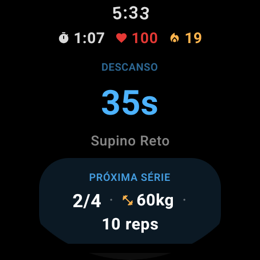
Automatic rest timer — after each set, a countdown shows the rest time your trainer set. You can skip it whenever you're ready.
Tactile feedback on every action — distinct haptics for workout start (.start), set confirmation (.success), rest end, and summary delivery.
Full summary when you finish — total duration, sets completed vs. planned, and total volume lifted (kg). Sent to your iPhone with a single tap.
Works offline — workouts are stored locally. The execution log is queued and synced automatically once the iPhone is nearby.
Early termination with a choice — your student can leave before finishing the workout and chooses whether to save partial progress or discard it.
Android · Jetpack Compose · Wearable Data Layer
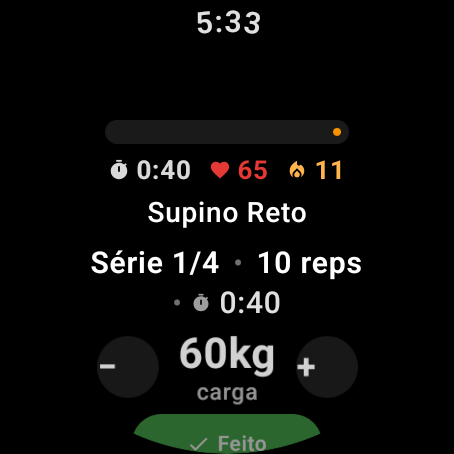
Wearable Data Layer sync — workouts reach the watch in the background via Android's native API, with no manual intervention.
Full execution on your wrist — exercise, equipment, load, reps, and set counter in a Compose interface optimized for a circular screen.
Rest timer with vibration alerts — the countdown appears highlighted in orange. When it hits zero, the watch vibrates in a double pattern to let you know it's time to get back to it.
Distinct vibration patterns — single pulse (100ms) when confirming a set; double pulse at the end of rest; long pulse when the workout is completed.
Always-on display during workouts — the watch keeps its display on while the workout is in progress, so your student never loses visibility.
Log saved locally and synced to the app — the execution log (sets, loads, reps, duration) is stored on the watch and sent to the phone flagged as urgent.
Early session-end dialog — your student can leave before finishing and chooses between saving partial progress, discarding it, or continuing the workout.
Any workout created or updated by the trainer shows up on the client's watch with no manual action needed. Syncing happens in the background via Bluetooth.
The student can walk into the gym, leave their phone in the locker, and run the entire workout from their watch. The log is stored locally and synced later.
Every workout completed on the watch generates a full log — sets, loads, reps, and duration — that the trainer sees on the dashboard as soon as the student syncs.
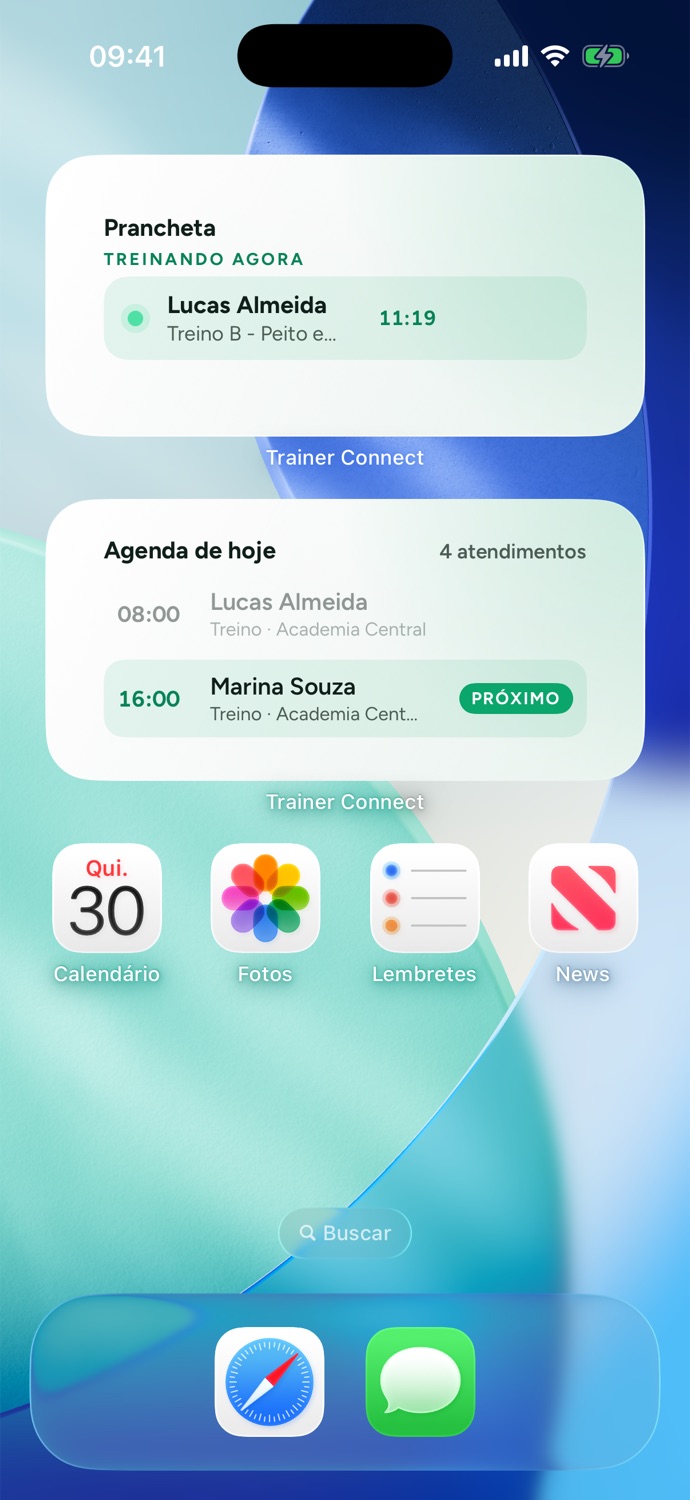
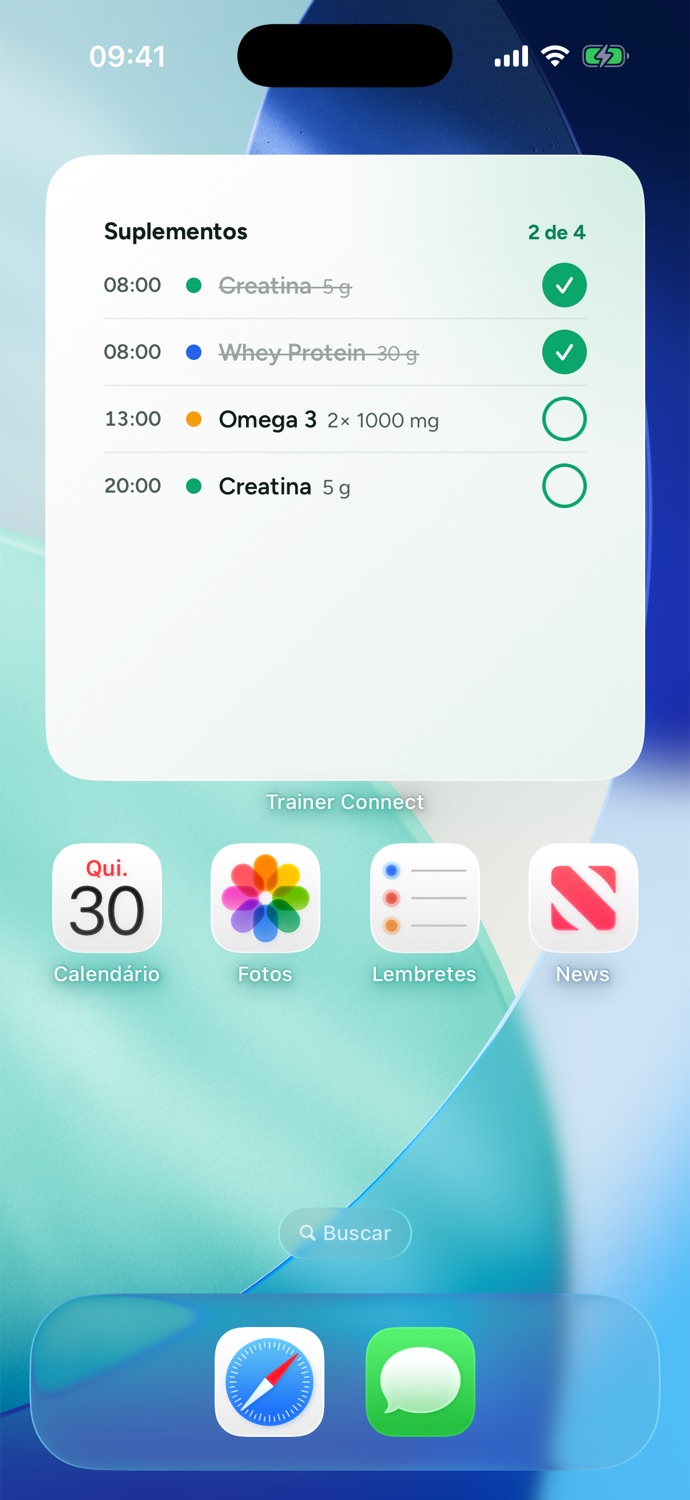
Without opening the app: the student sees today's workout, the week's lineup, and any pending supplements. You see who's training right now and today's schedule. One tap takes you straight to the right screen.
Time, dose, and what's already been taken. Marking as taken from the widget also updates the reminder inside the app. See supplement tracking in action.
Who's training right now, with the clock running, and the upcoming sessions for the day.
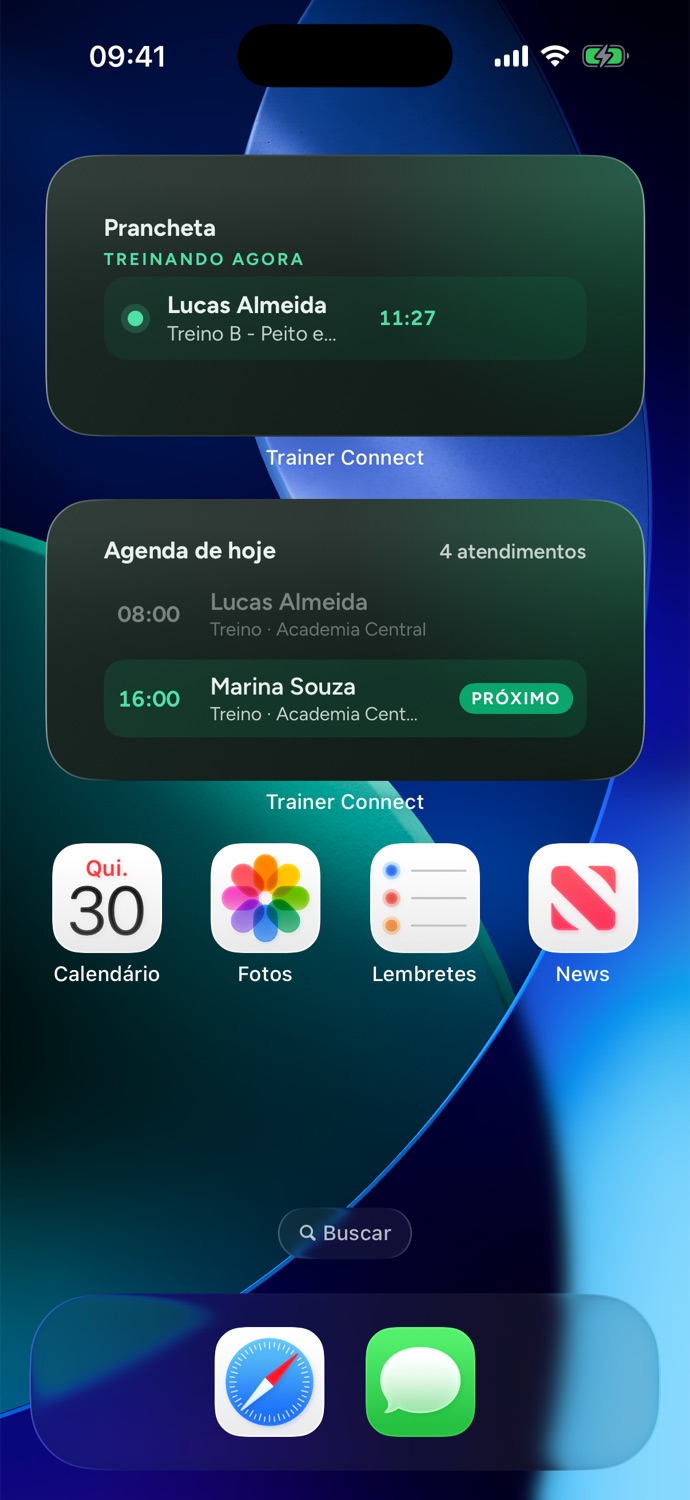
The widgets match your device's theme, no setup required.
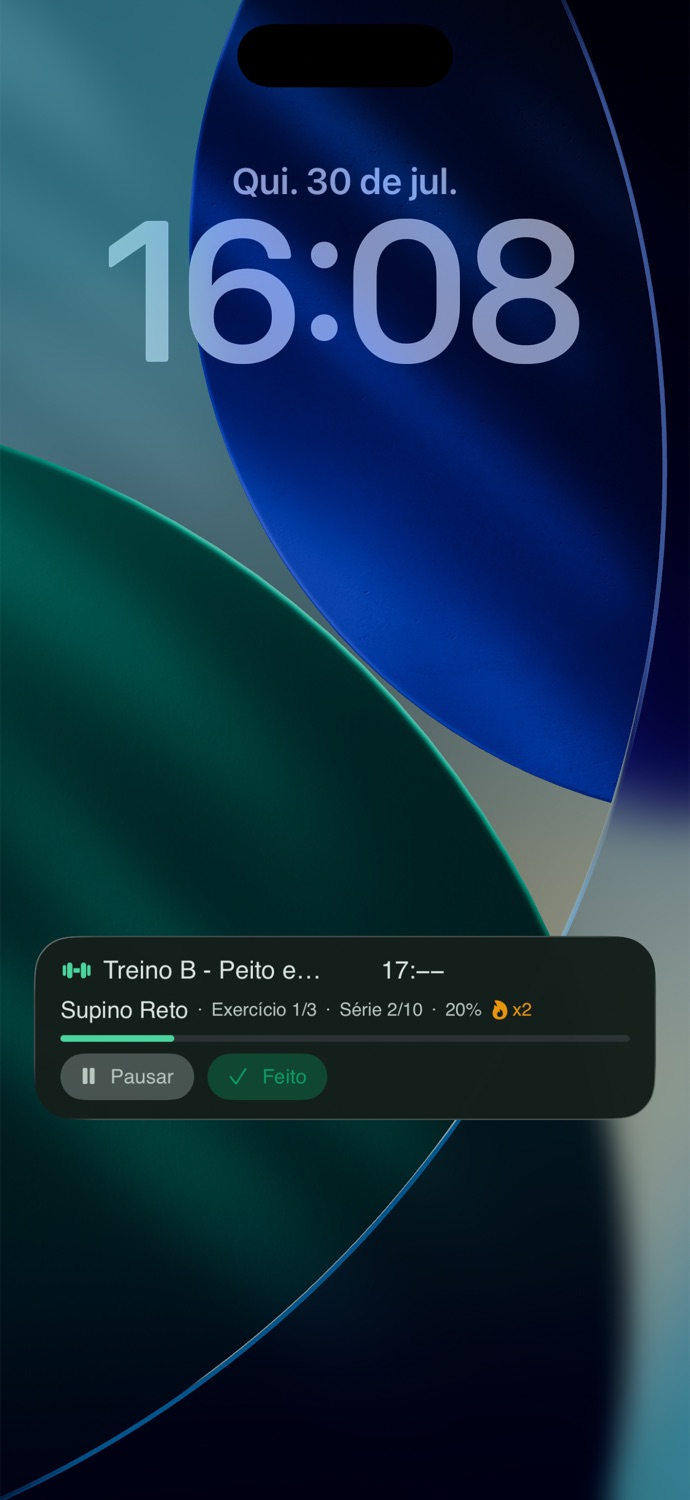
Track the workout in real time without opening the app. Current exercise, rest timer, remaining sets, and progress — all visible on the Lock Screen and Dynamic Island.
When the rest period starts, the timer pops up automatically. Leave the app and keep watching the countdown.
See which exercise is being performed, current set, load, and how many are left — right on the Dynamic Island.
A progress bar shows how much of the workout is done. Extra motivation to complete every set.
Your workout stays visible right alongside your regular notifications. No need to switch between apps.
A professional link ready to share — your own subdomain (think Linktree for fitness), lead capture, and checkout, all on your social media in 1 click.
Explore My Page →Find out how much you save by replacing spreadsheets, scheduling, payment gateways, and separate apps with a single platform.
Calculate my savings →Plans for independent students, personal trainers, and nutritionists. Start free and scale as your needs grow.
Plans for Personal Trainers and Nutritionists
Get started now with 1 client
Forever — no gimmicks
For personal trainers and nutritionists
$79.99/year
AI allowance renews every month, even on annual plans
Open enrollment. Check subscription availability in the app.
Create free account →For personal trainers and nutritionists ready to scale
$249.99/year
AI allowance renews every month, even on annual plans
Open enrollment. Check subscription availability in the app.
Create free account →* Payments from students carry a 1% platform fee, plus fees charged by the payment processor.
Approved pricing shown for reference. Check subscription availability in the app.
Plan for Independent Clients
If you train with a personal trainer, you pay nothing. Independent students can subscribe to Premium for $2.99/month.
Start training on your own
Forever — no gimmicks
Unlimited workouts + specialist catalog
Cancel anytime
Personal trainers and nutritionists get the same pricing. Legacy plans remain available only for managing existing subscribers.
| Premium Client | Free | Starter | Unlimited | |
|---|---|---|---|---|
| Target Audience | Independent client | Trainer or nutritionist | Trainer or nutritionist | Trainer or nutritionist |
| Active clients | — | 1 | 3 | ∞ |
| AI credits per month | Exclusive benefits | 20 | 40 | 200 |
| Monthly price | R$14.90 | $0 | $7.99 | $24.99 |
| Annual price | R$149 | $0 | $79.99 | $249.99 |
| Workouts, scheduling, chat, and assessments | ✓ | ✓ | ✓ | ✓ |
Answers to the most common questions about Trainer Connect.
Whether you're a personal trainer or an independent student, Trainer Connect has everything you need to make real progress.