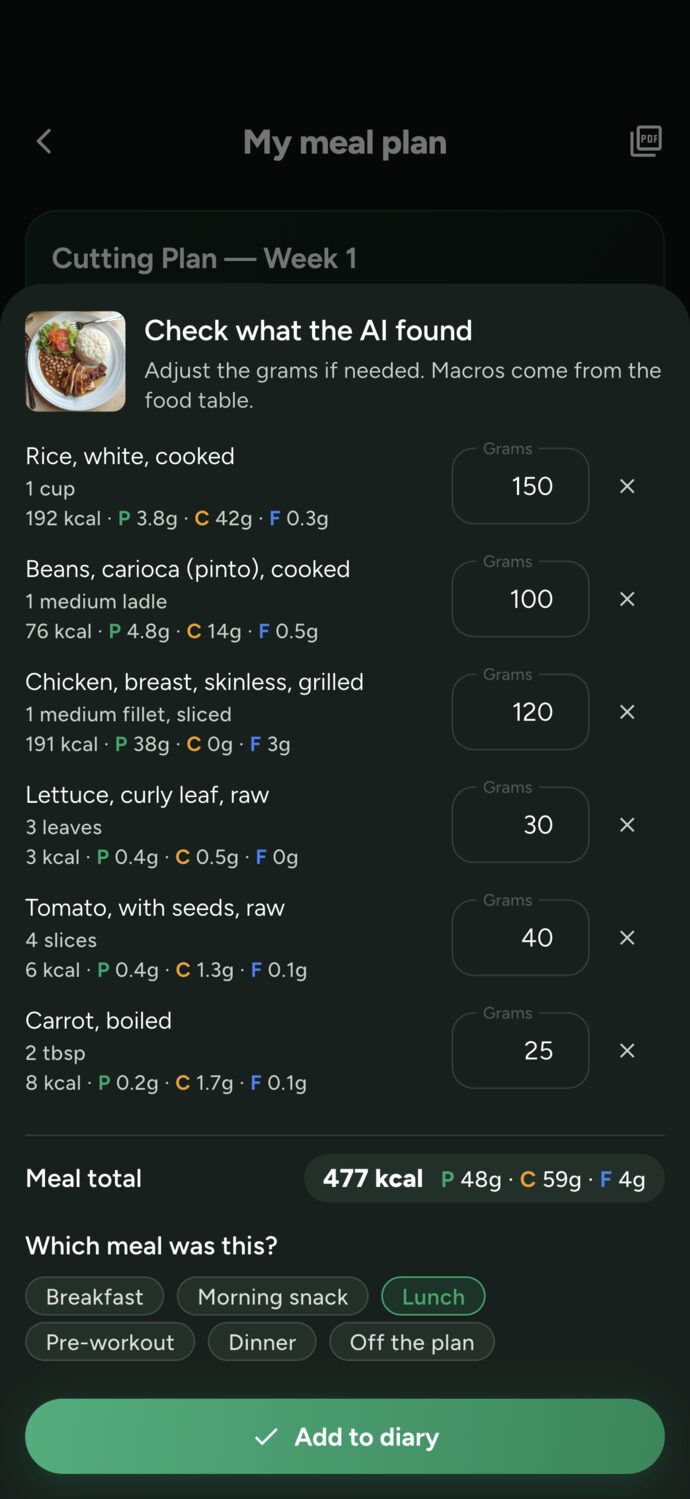
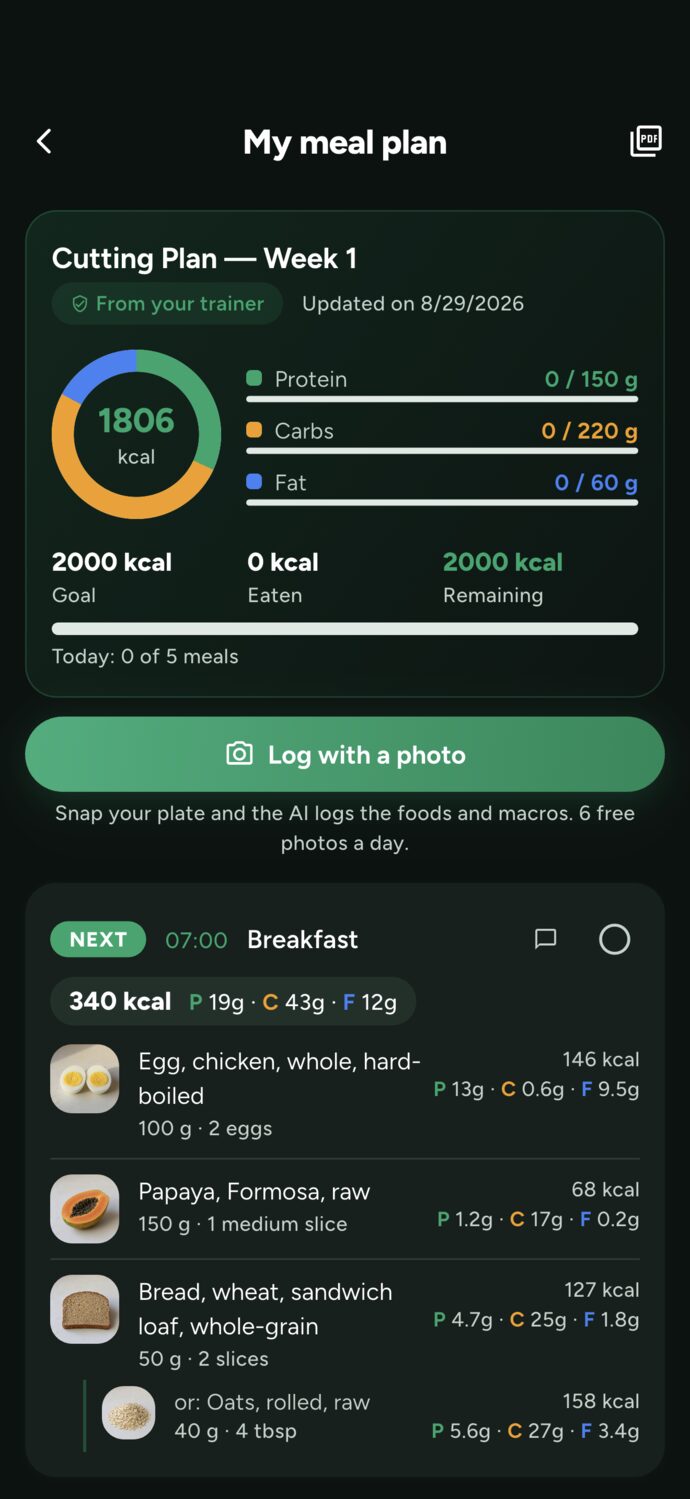
The AI builds the meal plan from the student's assessment, intake form, and training routine, using foods from the TACO food composition table. The grams come from the math, not a guess: calories, protein, carbs, and fat land within 5% of the target. Then the student snaps a photo of the plate and the AI logs the meal in the diary. The Free plan includes 20 AI credits per month; each meal plan uses 3.
Four steps in the app, on your phone or computer. What used to take an afternoon of spreadsheets and nutrition tables now takes about half a minute.
Weight loss, maintenance, or muscle gain, 2 to 8 meals a day, restrictions (lactose intolerance, vegetarian, allergies), and preferences (delivery lunches, meal prep, skipping breakfast).
Before generating, the app shows the student data that factors into the calculation: age, sex, weight, height, last physical assessment, intake form, and how many times they trained in the last 4 weeks.
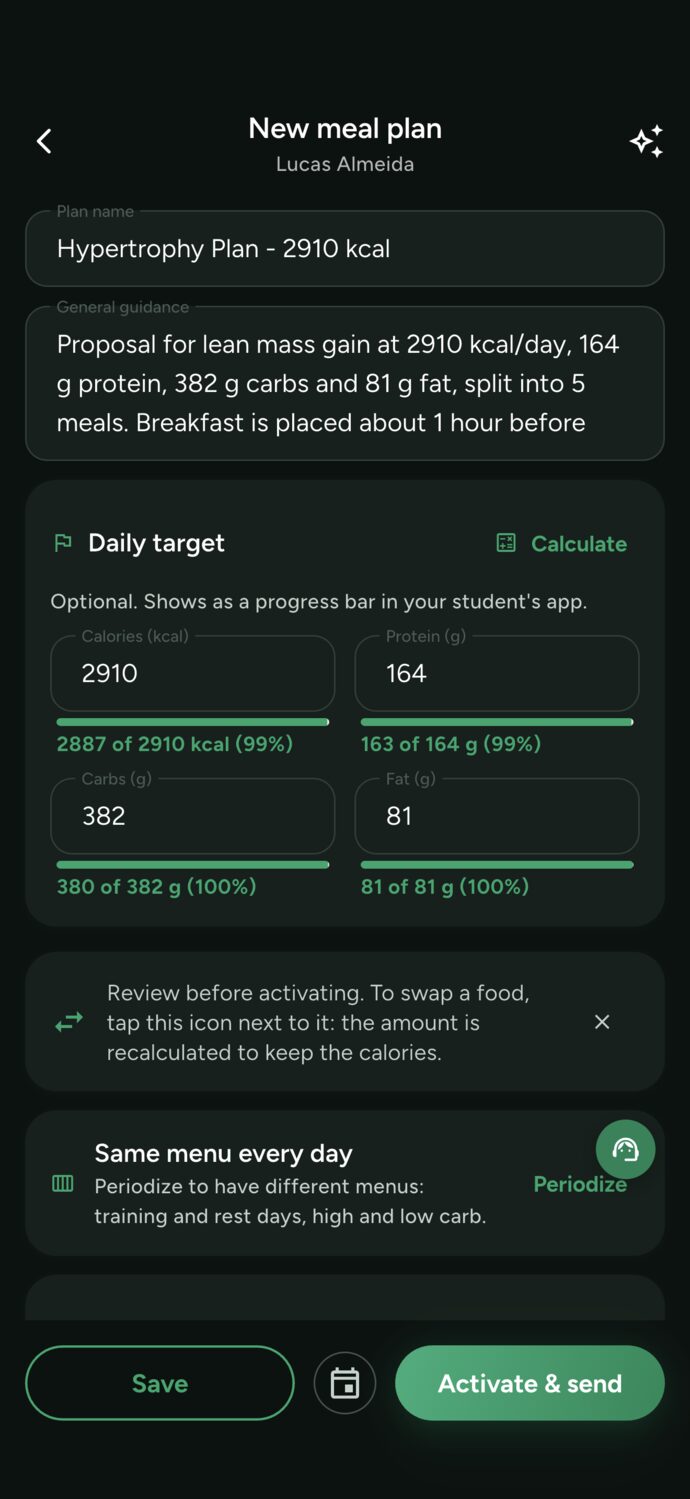
The target comes from the Harris-Benedict formula using the student's actual training. The AI picks foods, meal times, and substitutions; the grams get adjusted by calculation until all four targets are met.
The meal plan arrives as a draft in the editor, with a photo of each food, the serving size, and progress toward each goal. Adjust anything you want and tap Activate: the student receives it on their phone, with a reminder at each mealtime.
Tracking a diet always runs into the same problem: logging what you ate is a hassle, and students give up in the first week. Here, they just snap a photo of the plate; the AI recognizes the foods and estimates the grams, and the macros come from the TACO food table, not a guess from the model.
The difference between asking a chatbot for a meal plan and generating one inside the app is context: everything you've already logged about the student factors in automatically, no copy-paste required.
Weight, height, body fat percentage, and waist measurement from the latest assessment. That's what drives calorie needs and protein per kilogram.
Allergies, intolerances, and conditions logged in the intake form become restrictions: someone who's lactose intolerant won't get dairy in their meal plan.
Actual sessions from the last 4 weeks set the activity factor. Someone training five times a week doesn't get the same meal plan as someone training twice.
About 600 foods from the Brazilian food composition table, with photos and household measures. A food that's not in the catalog never sneaks in as if it were.
Each food can come with equivalent swaps for the main macro, like tapioca instead of bread. The student marks what they actually ate.
The same math behind the site's BMR and macro calculators, based on the student's actual training: 20% less to lose fat, 15% more to build muscle.
A meal plan the client doesn't follow changes nothing. What happens after it's generated is what sets the app apart from a PDF.
You can, and that's how a lot of people start. The problem shows up when it's time to actually use the result. The chatbot doesn't know the client's assessment or training program, so every request starts with copying measurements, restrictions, and routines out of your system. And it hands back a block of text someone still has to turn into a table, double-check, and send.
And the numbers often don't add up. We tested this on our own AI-generated plans in September 2026: without a system doing the math behind the scenes, 6 out of 20 AI-generated meal plans were more than 8% off target that she herself had set — and worse, went 38% over target. Language models are great at picking foods, but they can't add up twenty items in their head.
That's why, in Trainer Connect, the AI handles the part it's good at (choosing foods, timing, swaps, and serving sizes) while the math is left to the server: gram amounts are calculated and adjusted until calories, protein, carbs, and fat land within 5%, with macros sourced from the TACO food database.
There's also LGPD to consider. Health data is sensitive personal data and pasting your student's intake form into some general-purpose tool with a personal account is the kind of thing you don't want to explain later. Inside the app, the AI only gets what it needs, at the moment of generation, and the result stays on the trainer's account.
The Free plan gets 20 AI credits per month, no card required, and supports 1 student. Starter gets 40 and Unlimited gets 200. Each meal plan generated uses 3 credits; importing a plan from another app uses 5. The monthly allowance renews every month and doesn't roll over; credits from top-ups never expire.
| Plan | Price | Active clients | AI credits per month | AI meal plans per month* |
|---|---|---|---|---|
| Free | $0 | 1 | 20 | up to 6 |
| Starter | $7.99/month or $79.99/year | up to 3 | 40 | up to 13 |
| Unlimited | $24.99/month or $249.99/year | no limit | 200 | up to 66 |
* If all of the month's credits go toward meal plans. Editing or reusing a meal plan doesn't use any credits.
For students, logging a meal by photo is free for up to 6 photos a day. From the seventh on, each photo uses 4 credits from their wallet, which they can top up right in the app. Compare full plans or create your free account.
Build your patients' nutrition plans using the TACO food database, calculated targets, and food substitutions, then track adherence through the food diary and meal photos. In the app, the people you work with show up as clients; for you, they're patients.
Training and nutrition in the same app, backed by the same assessment. Use the meal plan within the scope your practice allows, and work alongside the student's nutritionist when the situation calls for it.
With a professional who uses Trainer Connect, you get your meal plan on your phone and log meals with a photo. Training on your own? On Student Premium you build your own diet using the TACO food database, or find a trainer.
AI speeds up the work; the responsibility stays with the trainer. Four rules that apply to every meal plan.
Generation lands in a draft in the editor. The student only receives it once you tap Activate and send; until then, the meal plan is yours alone.
Food, quantity, household measure, time, and substitutions are all regular fields in the editor, and progress toward each target updates live as you edit.
The AI receives a summary of the student (age, sex, measurements, restrictions, and training frequency) at the moment of generation, through the Anthropic API, which doesn't use API customer data to train models. Every generation is logged in your account.
The AI doesn't evaluate anyone and doesn't know what wasn't logged. The meal plan is the responsibility of whoever publishes it, within the scope of their professional credentials. The AI prepares; the trainer decides.
Create your free account, add your client, and generate a meal plan with your 20 monthly credits. You review everything before sending it.
Create free account →