Supplementation

Supplement tracking: reminders at the right time and adherence you can actually see

Creatine, whey, omega-3, vitamin D: every supplement is set up with its dose, times, and days of the week. Clients get a reminder on their phone and mark it as taken right from the notification, the home screen widget, or the app. Trainers see, day by day, what was taken, skipped, or missed. For clients, it's free.

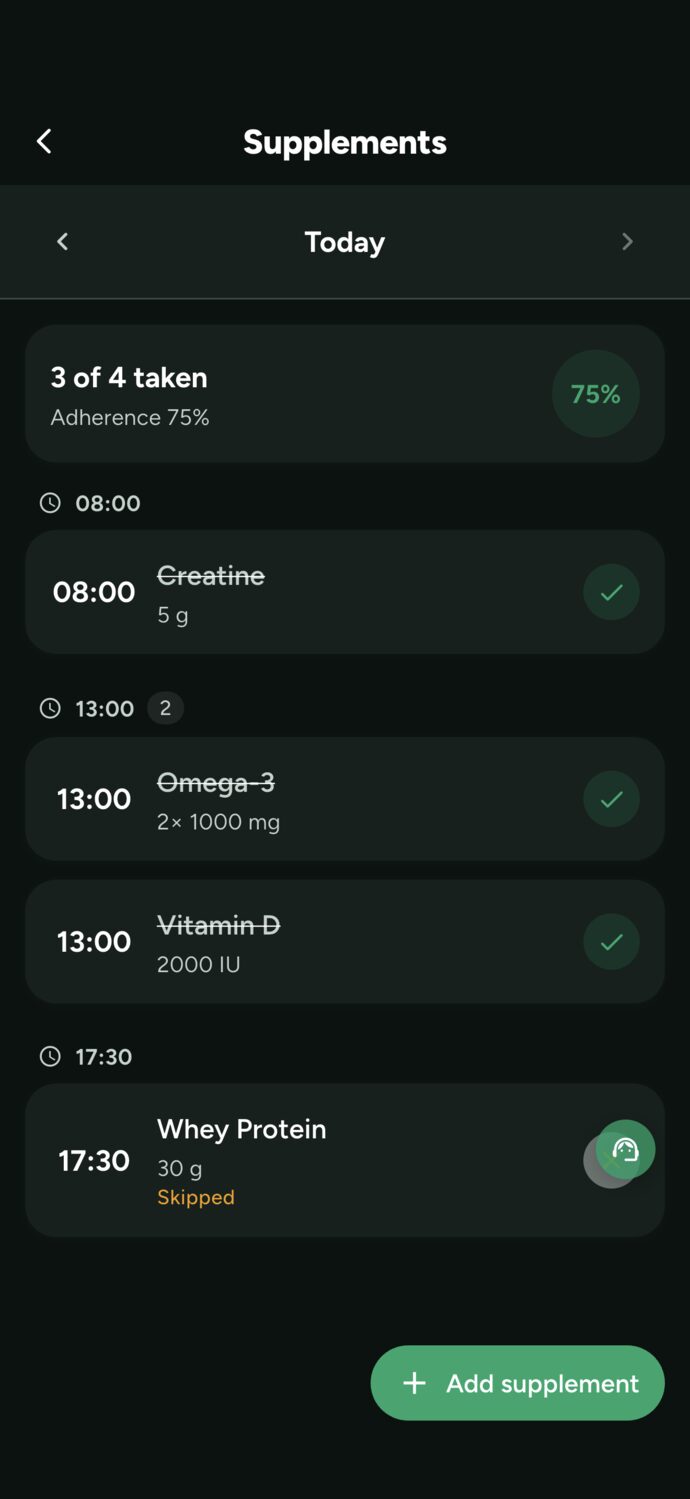
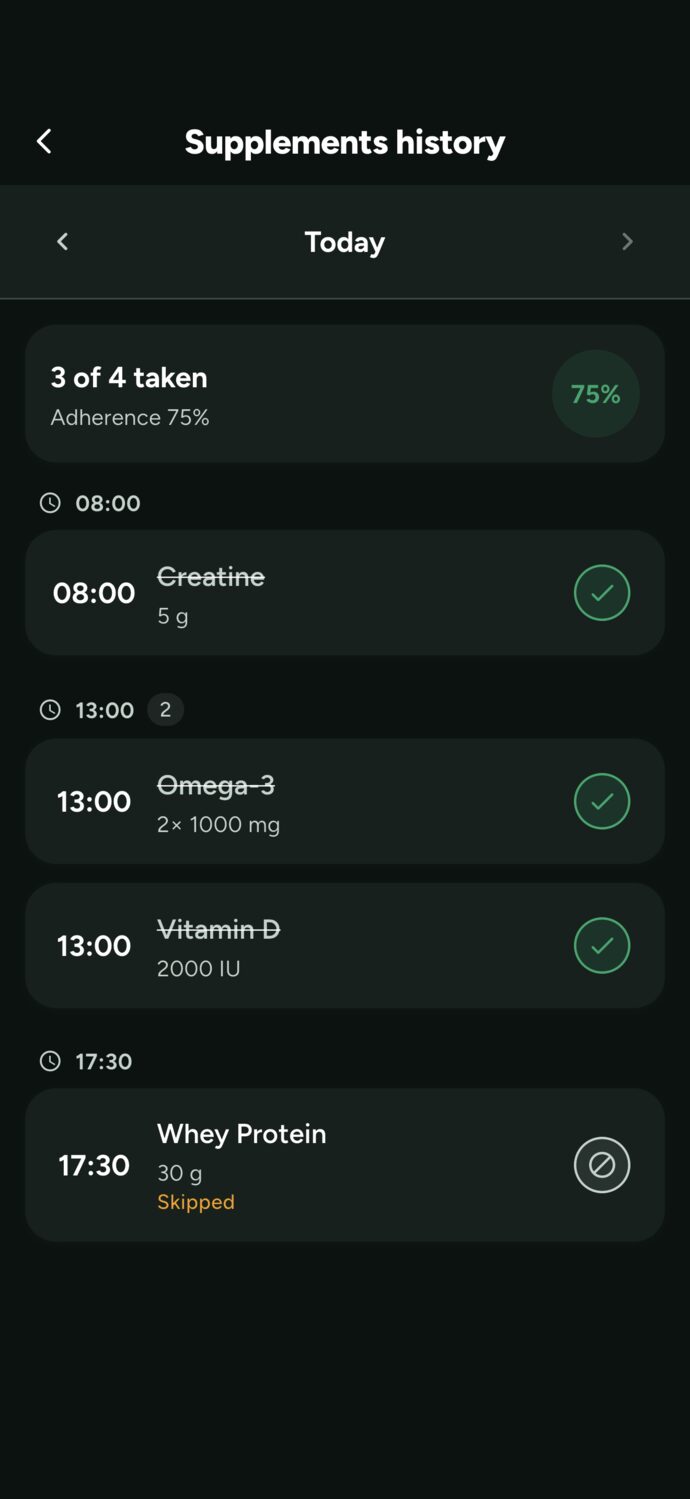
Supplement history in the Trainer Connect app: 3 of 4 taken, 75% adherence, with creatine, vitamin D, and omega-3 checked off and the whey skipped

How supplement tracking works

Four steps, on your phone or computer. The protocol goes from paper (or a lost WhatsApp message) to reminding itself.

1

Set up the protocol

Name, form (powder, capsule, tablet, liquid, gummy), dose and unit (g, mg, IU, scoop, drops, spoon), how many units per serving, one or more times, the days of the week, and, for a cycle, the end date.

2

The reminder shows up right on time

Notification at the scheduled time, in the client's own time zone. Anything due at the same time is bundled into a single notification, and anything already checked off won't trigger a reminder.

3

Checked off in one tap

Mark as taken right from the notification, the home screen widget, or the app. Didn't mark it? 30 minutes later, a second reminder shows up.

4

Adherence is tracked automatically

Every dose becomes taken, skipped, or overdue. The client sees the day broken down by adherence percentage, and the trainer sees the same thing on their profile.

Setup

A tracking system that understands how supplements are actually taken

Spreadsheets and phone alarms don't know that creatine is every day, whey is only on training days, and vitamin D has an end date. Here, every supplement carries its own rule.

  • The right dose and form. 5 g of creatine powder, 2 capsules of 1000 mg omega-3, 2000 IU of vitamin D. Units range from grams and milligrams to scoops, drops, and spoonfuls.
  • More than one time per day. The same supplement can have multiple times a day, and the reminder fires for each one.
  • Only on the right days. Every day, Monday through Friday, or the days you choose. Post-workout whey won't buzz on Sunday.
  • Cycles with a start and end date. An eight-week protocol wraps up on its own on the end date. A supplement that's no longer part of the routine gets archived with its history saved, and it's back with one tap.
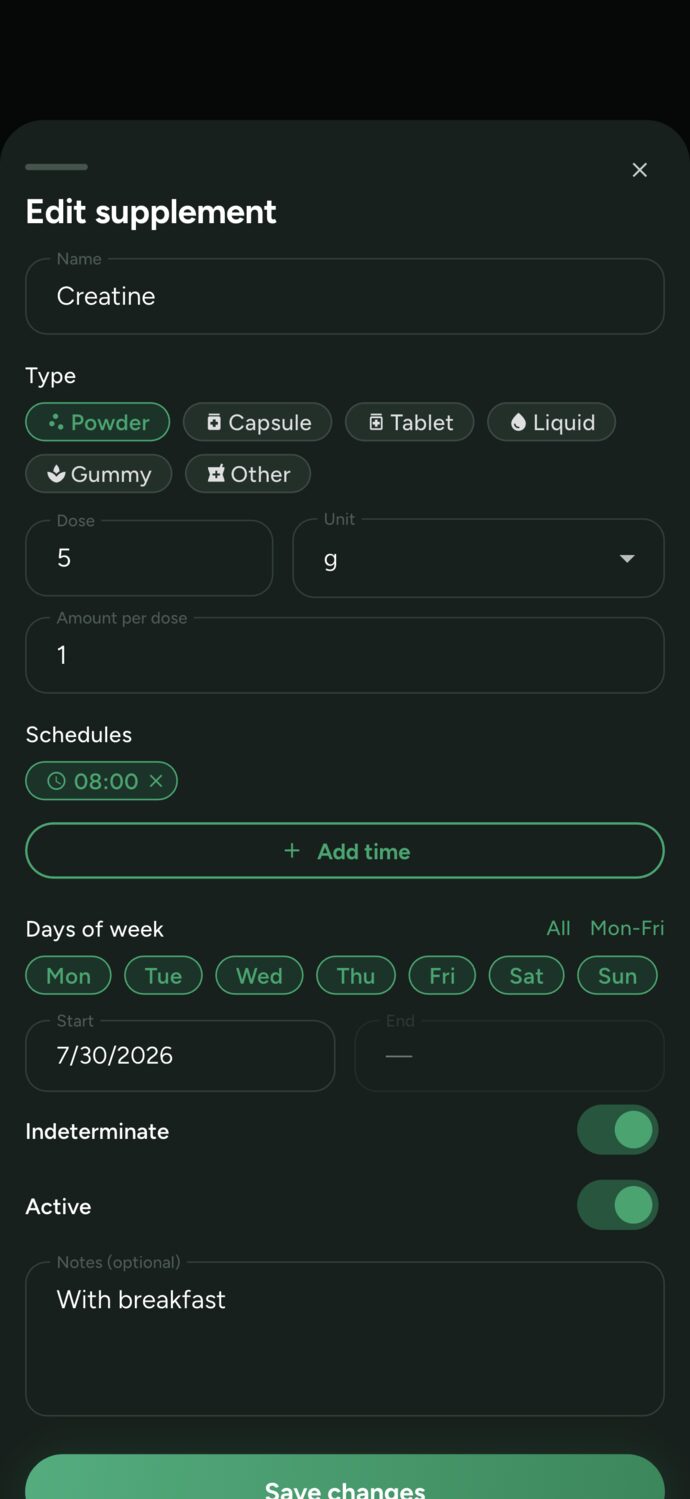
  • With a note attached. With breakfast, after training, away from coffee: the instructions show up right next to the supplement.
Supplement form in Trainer Connect: creatine, powder, 5 g, one unit per dose, reminder at 8:00 AM every day, with the note With breakfast
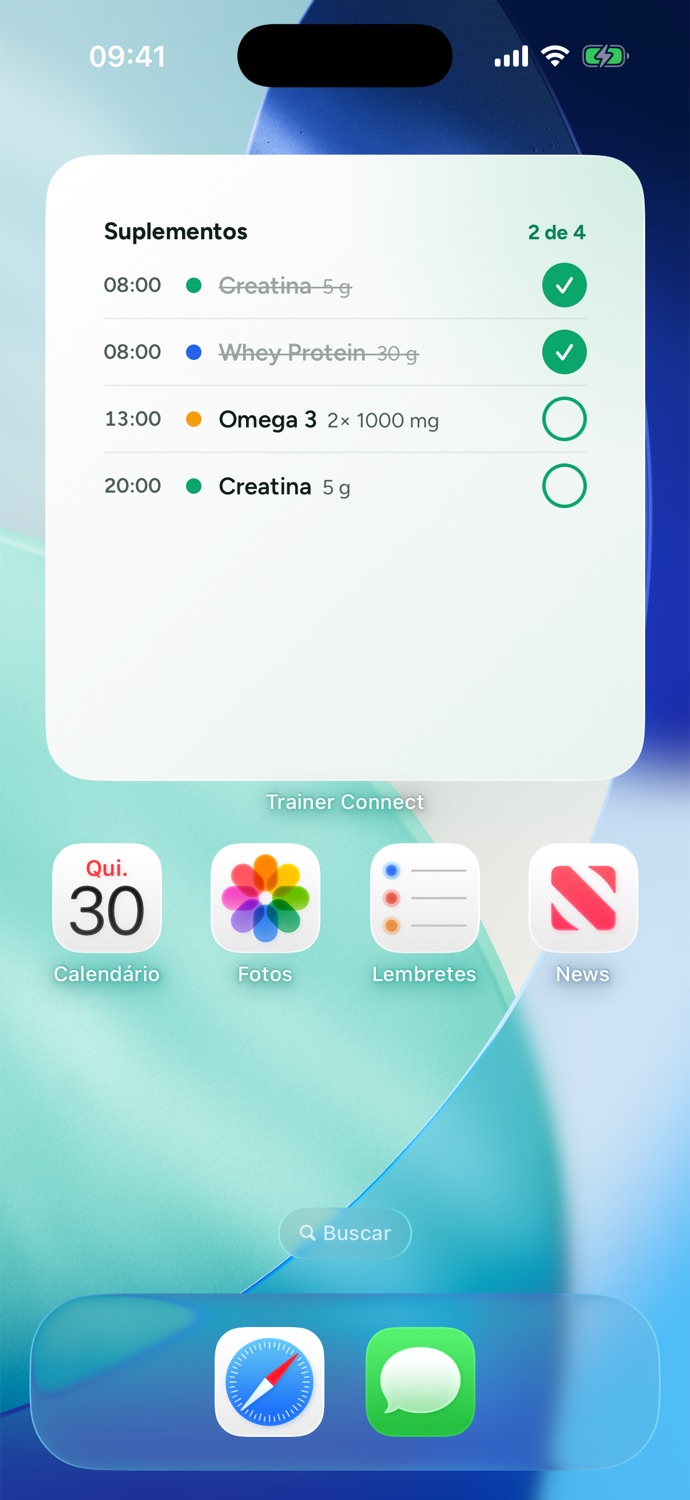
Supplement widget on the iPhone home screen, with creatine and whey already checked off and omega-3 pending, counter showing 2 of 4
Reminders and widget

The reminder that fixes "I forgot to take it"

The research on supplements was done with people who took them every single day. What tanks results is rarely the brand or the dose — it's forgetting three times a week.

  • A notification that logs it for you. Supplement time: creatine, omega-3. The Mark as taken button is right on the notification, no need to open the app.
  • Second reminder. 30 minutes after the scheduled time, if it's still not marked, the reminder comes back. Anyone who took it early won't get anything.
  • Home screen widget. Today's supplements right on the iPhone and Android home screen, with a checkbox next to each one.
  • Taken, skipped, or missed. Skipping is different from forgetting: the student can log that they skipped it, and the history shows the difference.
For trainers

Your client's supplementation, right alongside their training

You open the student's profile and see their whole day: what was taken, what they skipped, and what's overdue. No need to ask on WhatsApp, no relying on anyone's memory.

  • Set it up for them. On the client's supplement screen, tap Add supplement. It shows up in their app and the reminder lands on their phone — no setup needed on their end.
  • Any day, right on time. Browse through past days and see how many doses were taken, the percentage, and what was missed.
  • The right conversation at the right time. Three days without creatine? Reach out on in-app chat before the student decides the supplement doesn't work.
  • At no extra cost. Supplement tracking is included in every plan, including Free, and doesn't use AI credits.
Student's supplement screen as seen by the trainer in Trainer Connect: Saturday, 2 of 3 taken, creatine overdue, vitamin D and omega-3 taken, Add supplement button

Supplements and AI-powered meal plans in one app

Trainer Connect also builds meal plans with AI. Based on the client's assessment, intake form, and training frequency, the AI picks foods from the USDA database, and the server calculates calories and macros. The client follows the meal plan with a reminder for each meal and logs their plate with a photo. See how AI-powered meal plans work.

Supplements fit into the same routine, each with its own reminder: creatine at breakfast, vitamin D at lunch, whey after the workout. Workouts, meals, supplements, and water all live in one app, with a history you can track.

One thing AI doesn't do, and that's on purpose: it doesn't prescribe supplements. The generated meal plan covers food only. Individual supplementation protocols are the responsibility of a licensed nutritionist or physician, so the qualified professional decides what the client takes, and the app makes sure they actually take it.
Why consistency matters more than the supplement brand

The most researched supplements — creatine, whey, omega-3, and vitamin D — were studied in people who took them every single day. Creatine depends on daily use to keep muscle stores topped up; omega-3 and vitamin D build up their effects over months. Taking them "whenever you remember" puts the client outside of what the studies actually measured.

The reasons people forget are always the same: the bottle sits in the cabinet, the supplement isn't tied to any daily habit, and results take weeks to show up, so the client loses motivation first. A reminder tied to something that already happens — breakfast, lunch, post-workout — plus one-tap logging solves most of it. The adherence history shows whether it's actually working before anyone decides the supplement "doesn't do anything."

To dig deeper, the blog has two articles on this topic: why consistency beats dosage, about adherence, and also what trainers can (and can't) recommend about supplements.

Who it's for

Nutritionist

Set up the patient's protocol and track whether they're taking it, day by day, right next to their meal plan adherence. In the app, the people you work with show up as clients; to you, they're patients.

Personal trainer

Log what the student already takes or what their dietitian recommended, and track consistency right alongside their workouts. Individual supplementation guidance still belongs to licensed professionals.

For students who take supplements on their own

Supplement tracking is free for the client, with or without a trainer: add a supplement, get the reminder, and track your adherence. Create your account or find a trainer.

Frequently asked questions about supplement tracking

Is there a free app to track supplements?
Yes. In Trainer Connect, supplement tracking is free for students, with or without a trainer: log dosage, times, and days of the week, get phone reminders, mark as taken with one tap, and view adherence history. For trainers, the feature is included in every plan, including the Free plan, and doesn't use AI credits.
How do I remember to take creatine every day?
Tie creatine to a habit you already have, like breakfast, and set that time in the app. Trainer Connect sends the reminder right on schedule, with a Mark as taken button right in the notification; if you don't mark it, it reminds you again 30 minutes later. The home screen widget shows what's still left to take for the day.
Can I set up supplements at different times and on different days?
You can. Each supplement can have one or more times, specific days of the week (every day, weekdays only, or whatever you choose), and, for cycles, a start and end date. Supplements scheduled at the same time arrive together in a single notification.
Can the trainer see if the client took their supplements?
It can. On the client's profile, the supplement screen shows each day with what was taken, what was skipped, what's overdue, and the adherence percentage. Trainers can also set up and edit their clients' supplements, and the reminder shows up right on the client's phone.
Does the AI build the supplementation plan along with the diet?
No, and that's by design. Trainer Connect's AI builds meal plans using the USDA food database and doesn't prescribe supplements, medication, or therapeutic diets. The supplementation protocol is set by the qualified professional; the app handles the reminders and adherence tracking.
Can a personal trainer prescribe supplements?
Prescribing individual supplementation, with dosage and protocol for a specific person, is a job for a registered dietitian or physician. A trainer can speak in general terms about what has evidence behind it, reinforce consistency, and refer the student to a dietitian. In the app, they can log the protocol the student already follows to track adherence.
Does it work on iPhone and Android?
Yes. Trainer Connect has apps for iPhone and Android, plus a web version. The reminder with the Mark as taken button and the supplement widget work on both systems; on iPhone, marking directly from the widget requires iOS 17 or later.

Start tracking supplements today

Create your free account, add your supplements (or your clients'), and get your first reminder at the next scheduled time.

Create free account →